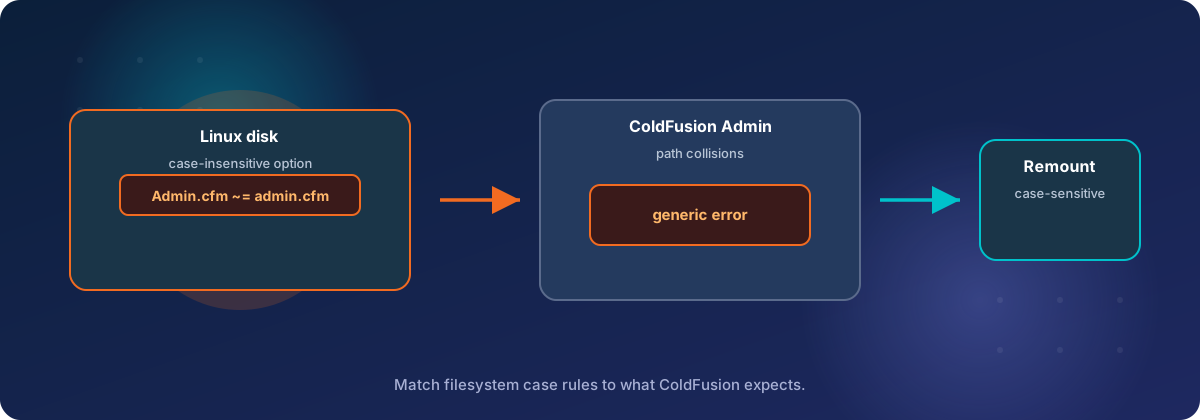
Half of ColdFusion Administrator started returning a generic error on a new Linux server, and the cause was a disk option we had chosen on purpose: case-insensitive file names.
The symptom
Seven sections of ColdFusion Administrator returned a 500 error on a server we were preparing for a client migration, while the rest of the Administrator worked normally. The server runs Adobe ColdFusion 2025 (update 13) from Adobe's Docker image on Amazon Linux 2023.
The page showed only "The web site you are accessing has experienced an unexpected error." Logging out, logging back in and restarting the container changed nothing.
| Failed with a 500 | Worked |
|---|---|
| Data Sources | Scheduled Tasks |
| Security | Server Settings |
| Package Manager | Log Files |
| Extensions | |
| Archives | |
| Enterprise Manager | |
| Vector Stores |
Every failure logged the same entry in exception.log:
coldfusion.security.SecurityManager$UnauthenticatedCredentialsException
    at coldfusion.security.SecurityManager.getAdminHash(SecurityManager.java:3453)
    ...
    at cfApplication2ecfm1718547436.runPage(/CFIDE/administrator/Application.cfm:209)
    ...
    at cfApplication2ecfm816536346.runPage(/CFIDE/administrator/datasources/Application.cfm:8)
The exception name points at credentials, and that is misleading. The password and the login were fine. The split in the table was the real clue: every section on the left has its own Application.cfm, and every section on the right does not.
Why the disk was case-insensitive in the first place
We made the data volume case-insensitive on purpose, because the application was moving from Windows to Linux. On Windows, Signatures\Scan.PDF and signatures\scan.pdf are the same file. On Linux they are two different files, and code that mixes the spellings fails with "file not found".
The application has several hundred CFML templates and tens of thousands of uploaded documents and images, written and named over many years on a file system that never checked case. Auditing every include, every file read and every stored file name before cutover was not realistic. A case-insensitive volume lets that code behave on Linux as it did on Windows.
So the data volume was formatted as XFS with ASCII case-insensitive names. This is chosen when the file system is created and shows up later as ascii-ci=1:
# at format time
mkfs.xfs -n version=ci /dev/<device>

# to check an existing volume
xfs_info /data | grep ascii-ci
For the application's code and data, that decision did its job. The mistake was a separate one. ColdFusion's own installation folder has to survive the container being recreated, so it was stored on the same volume, next to the site. That put ColdFusion itself on a case-insensitive disk, which Adobe's code does not expect on Linux.
What was actually happening
ColdFusion found the Administrator's Application.cfm under a lower-case name, and a case-sensitive security check then refused to recognise it. We read this from the update 13 classes on the server, because the Administrator's own templates ship precompiled.
- Each failing section has its own small
Application.cfm, which runs<cfinclude template="../Application.cfm">to pull in the Administrator's main one. - On Linux, ColdFusion resolves a relative include by trying the file name in lower case first. It looks for
../application.cfm, and only if that is missing does it try the spelling in the code. - On a normal Linux disk the lower-case name does not exist, so the second attempt finds
Application.cfm. On our volume the first attempt succeeded, and ColdFusion recorded the included template as.../CFIDE/administrator/application.cfm. - The main
Application.cfmthen calls an internal method,getAdminHash. That method only answers a caller whose template path ends in one of a fixed list of Administrator files, such as/CFIDE/administrator/Application.cfm. - On anything but Windows that comparison is case-sensitive.
application.cfmdid not matchApplication.cfm, so the method threwUnauthenticatedCredentialsException.
Sections without their own Application.cfm worked because ColdFusion reaches the main file directly there, with its real spelling, and no relative include is involved.
You can see the trigger with one command inside the container. On a healthy install the lower-case name is missing:
ls /opt/coldfusion/cfusion/wwwroot/CFIDE/administrator/application.cfmOn our server it listed the file.
What it was not
Six more obvious causes were checked and ruled out before the disk came under suspicion.
| Suspect | Why it was ruled out |
|---|---|
| Stale Administrator session | The error survived a container restart and a fresh login |
| Administrator password or its Docker secret | The exception is thrown by a path check, before any credential is examined |
| Core update and Administrator package out of step | Both were at 2025.0.13 |
| Tomcat web root configuration | It matched Adobe's stock Docker layout |
The /CFIDE mapping |
It pointed at the right folder, and the folder existed |
| Client-certificate login settings | The feature was switched off |
Two details cost us time and may save you some. First, the exception name sent us towards the login and the password, which had nothing to do with it. Second, the copy of SecurityManager in cfusion.jar was not the code that was running. The stack trace named line 3453, but that method ends near line 3200 in cfusion.jar. The running copy came from the update jar in lib/updates, which takes precedence.
Adobe's image has no javap, so we read the classes with the ASM library that ColdFusion already bundles in its lib folder.
The fix
We moved ColdFusion's installation folder to the server's root volume, which is ordinary case-sensitive XFS, and left the site and its data where they were. All seven sections loaded on the first login after the container came back up.
| What | Before | After |
|---|---|---|
| ColdFusion installation folder (settings, datasources, scheduled tasks, logs, CFIDE) | Data volume, case-insensitive | Root volume, case-sensitive |
| Site code | Data volume, case-insensitive | Unchanged |
| Uploaded documents and images | Data volume, case-insensitive | Unchanged |
The move took about a minute of downtime for 446 MB and 6,732 files:
- Back up the compose file.
- Stop the container, so nothing writes to the folder during the copy.
- Copy the folder with ownership, permissions, ACLs and extended attributes intact.
- Compare the two copies by checksum, and continue only if there are no differences.
- Point the container's volume at the new location and recreate it.
- Confirm the lower-case file name no longer resolves, then log in and open each section.
cd /opt/cf
cp -p docker-compose.yml docker-compose.yml.bak
docker compose stop

rsync -aHAX --numeric-ids /data/coldfusion/cfusion/ /opt/cf/cfusion/

# must print nothing
rsync -aHAXnc --numeric-ids --delete --itemize-changes \
      /data/coldfusion/cfusion/ /opt/cf/cfusion/

# in docker-compose.yml, change the volume line to:
#   - /opt/cf/cfusion:/opt/coldfusion/cfusion
docker compose up -d
The old folder stayed in place, renamed, as the rollback copy. Scheduled tasks, mappings and security settings all carried over, because they live inside the folder that was copied.
There was a smaller fix available. The check honours a JVM flag, -Dcoldfusion.admin.isbehindvdir=true, which makes that one comparison case-insensitive. We chose not to rely on it. We found no documentation for it, we only confirmed its effect on this single check, and it would have left ColdFusion on a kind of disk its code does not expect.
If you run ColdFusion on Linux
Keep ColdFusion's own folder on a case-sensitive file system, even when the application's code and data sit on a case-insensitive one. The two can live on different volumes, and the application does not notice.
To check a server:
# XFS: look for ascii-ci=1
xfs_info /your/mount | grep ascii-ci

# ext4: an F in the flags means the directory folds case
lsattr -d /your/folder

# any file system: the second command should fail
touch /your/folder/CaseTest && ls /your/folder/casetest
We only saw this on XFS. The lookup that causes it would succeed on any case-insensitive storage, so we would expect the same error with ext4 case folding, or with a folder shared into a container from a Windows or macOS host. We have not tested those.
Three cautions if you use a case-insensitive volume for a migrated application:
- Two files whose names differ only by case become one file. A code deploy from a case-sensitive repository can silently overwrite one with the other.
- The web server still matches URLs case-sensitively. A case-insensitive disk does not make
/Images/logo.pngand/images/logo.pngthe same URL. - XFS's
ascii-cioption is deprecated. The kernel's XFS configuration notes say it mishandles UTF-8 names, has been off by default in kernel builds since September 2025, and is due for removal in September 2030 (source). Treat it as a bridge for a migration, with a plan to fix the casing in the code.
If ColdFusion Administrator is failing after a move onto Linux, get in touch with Tierney Dynamics.
Comments