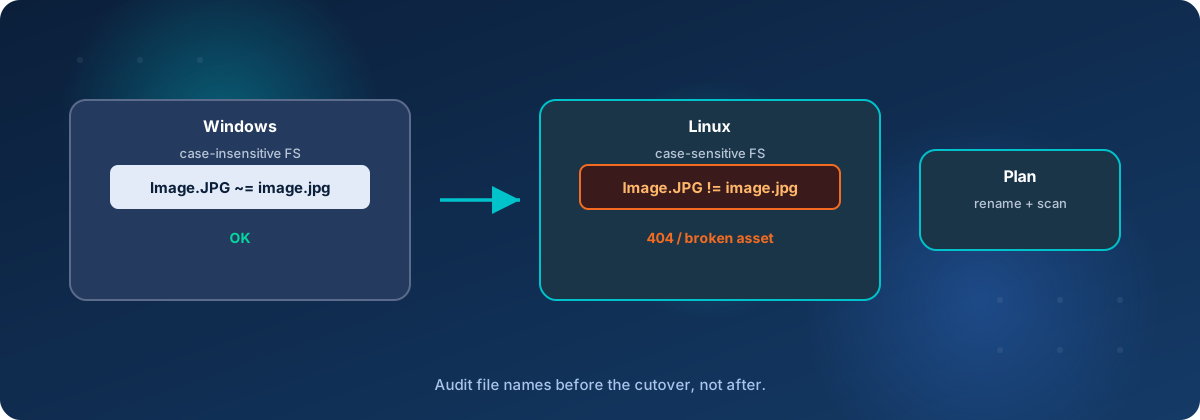
Moving your website from a Windows server to Linux can lower your hosting bill, but one small difference, capital letters in file names, can quietly break pages, images and links if nobody plans for it.
Why owners make the switch
Windows servers carry a license fee for the operating system itself, and that cost is built into what you pay a hosting company or a cloud provider. Linux has no per-server license fee, so the same website on a similar-sized Linux server typically costs less to run. Savings vary from site to site, so we look at your actual costs before recommending a move.
Linux is also a safe choice. It runs a large share of the world's web servers, and mainstream versions are kept current with security updates. Websites built on ColdFusion, Lucee and PHP run well on it.
The catch is not the server. It is how the two systems treat capital letters.
The catch: Windows forgives capital letters, Linux does not
Think of Windows as a forgiving receptionist. If your website asks for Logo.PNG and the file is saved as logo.png, Windows shrugs and hands it over. Linux is the strict receptionist. To Linux, Logo.PNG and logo.png are two different files, and if the name does not match exactly, it reports that the file does not exist.
Over the years, a website built on Windows picks up hundreds or thousands of small mismatches like this. Nobody notices, because Windows never complained. On Linux, they all show up on the same day.
One request, two filesystems
The page asks for
Logo.PNG
The file on disk
logo.png
Match
Capital letters are ignored. The file is handed over and the page looks fine.
Not the same file
The names do not match. Linux reports that the file does not exist.
What it looks like when it goes wrong
Because the website still loads, these problems can look like a bad launch rather than a technical one. The most common signs:
- Missing pictures and broken layouts. A logo or product photo does not appear, or a page loses its styling.
- Pages that fail. A page that pulls in other files, such as a shared header or footer, stops working when one of those names has the wrong capitalization.
- Old links that stop working. Links to your site from other websites, emails, printed material and search results may use capital letters the new server does not recognize. Customers see an error page, and search engines may drop those pages.
- Files that overwrite each other. Linux can hold
Report.pdfandreport.pdfside by side. If anyone copies the folder back to a Windows computer, one silently replaces the other. - Fixes that do not stick. Some tools on Windows overlook a rename that only changes capitalization, so a correction can look saved when it is not.
None of this is hard to fix. It is just far cheaper to find it before the switch than after.
How the problems get found before your customers see them
The risk comes from not looking. When the move is planned, every one of these problems can be found on a private test copy of your site, before your live site changes at all. The checks are straightforward:
- A scan of every file for names that clash when capital letters are ignored.
- A full walk through the test copy, following every link and loading every image the way a visitor would, and flagging anything that returns an error.
- A review of the server's error logs while someone clicks through the pages that matter most, such as checkout, contact forms and login.
- A look through the site's code for places that load other files, because a walk through the site cannot reach all of them.
Where Tierney Dynamics fits
Tierney Dynamics handles hosting, programming and system administration, so one team covers the whole move instead of passing pieces back and forth. For the capital letter problem, our role looks like this:
- Take stock of your site. We review what you run today, what it costs and how it is built, so the plan and the savings estimate rest on facts.
- Build a test copy on Linux. Your live site keeps running on Windows while we work.
- Find every mismatch. We run the checks described above and give you a plain-English list of what we found.
- Fix the files and the code. We correct the file names and the places in the code that refer to them, and settle on one naming rule so the problem does not come back.
- Protect your old links. Where other websites or search results use the old capitalization, we set up redirects so customers and search engines still land on the right page.
- Test, then switch. We re-run the checks, review the key pages with you, and move the live site only when everything is clean.
Deploy pipeline with case checks
-
Save the change
A file name or a reference in the code is updated.
-
Build the test copy
The change lands on the private Linux copy, not the live site.
-
Run the case checks
Every name is compared the way Linux will compare it.
-
Decision
Did the names match?
No. Send it back to be fixed. It never reaches the live site.
Yes. Continue to publish.
-
Publish to the live site
Only a change that passed the case checks goes live.
After the move, we can keep hosting and managing the server with these checks built into every update.
A few other small differences
Capital letters are the most common surprise, but not the only one. We also check for smaller Windows-versus-Linux differences, such as how folder locations are written in the code, how files are given permission to run, and how text files mark the end of a line.
What it means for your budget
Capital letters are the main thing standing between many businesses and a lower hosting bill, and the problem is solvable. With a test copy, a systematic check and a clean-up before launch, your customers should never see it. Whether the switch pays off depends on what you pay today, so the first step is to compare that with what your site would cost on Linux.
If you are thinking about moving your website off Windows, contact Tierney Dynamics. We will review your site, explain what the move would involve, and give you an honest view of whether it makes sense for your business.
Comments