If you run Adobe ColdFusion, sooner or later someone asks whether you really need Enterprise. Standard is cheaper, and on paper both editions run the same CFML. In practice the differences are smaller than the price gap suggests in some places, and much sharper than expected in others. This guide covers what changes, what quietly breaks under load, and how to decide.
A note on sources: edition details come from Adobe's product documentation and buying guide, plus long-running community testing. Where documentation and real-world behavior disagree, we say so. Always confirm against Adobe's current terms before you buy.
The short version
For many small and mid-size sites, Standard works fine. The problems show up in a handful of specific places:
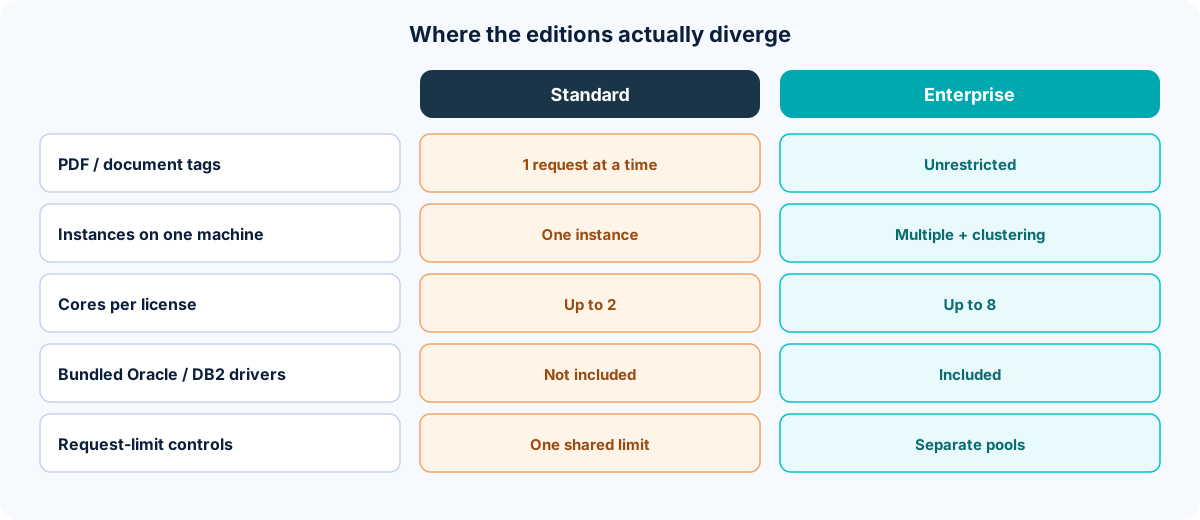
- Certain PDF and document tags are throttled to one request at a time.
- Standard allows no multiple server instances on one machine.
- A Standard subscription covers 2 cores, versus 8 for Enterprise (on the per-core model).
- Oracle (and a few other) bundled database drivers are Enterprise-only.
- Advanced scheduled-task and request-tuning controls are Enterprise features.
If none of those touch your workload, Standard is a reasonable choice. If any do, the savings can evaporate in labor and outages.
1. The Enterprise Feature Router: the gotcha nobody mentions
This is the item we'd put first. In Standard, a small group of functions still work, but they are throttled so that only one request at a time can use them across the entire server. Adobe's own comparison marks these as "restricted." They include PDF generation from HTML, PDF manipulation and form processing, and online presentation generation. Community lists for earlier releases also include server-side printing and, in some versions, spreadsheet handling.
Nothing errors. Requests simply queue. Under light use you will never notice. When several users trigger exports at the same moment (an end-of-month report run, an event registration rush, a batch of invoices), threads pile up behind the single-file line, and the site looks hung.
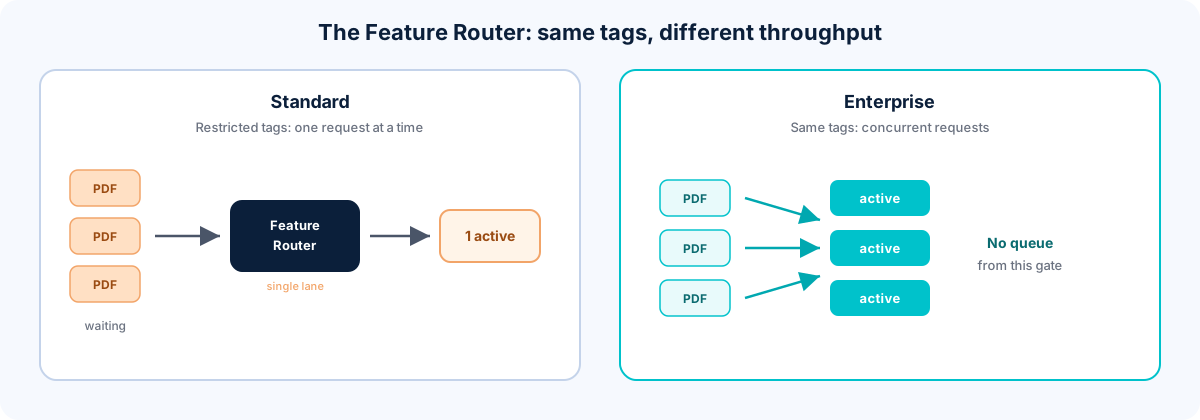
What to do: inventory every place your code generates PDFs, spreadsheets, or printed output. If it's occasional and low-volume, Standard is fine. If it's user-facing and bursty, either move generation to a separate queue or service, swap in a library that doesn't use the throttled tags, or budget for Enterprise.
2. Multiple instances and clustering
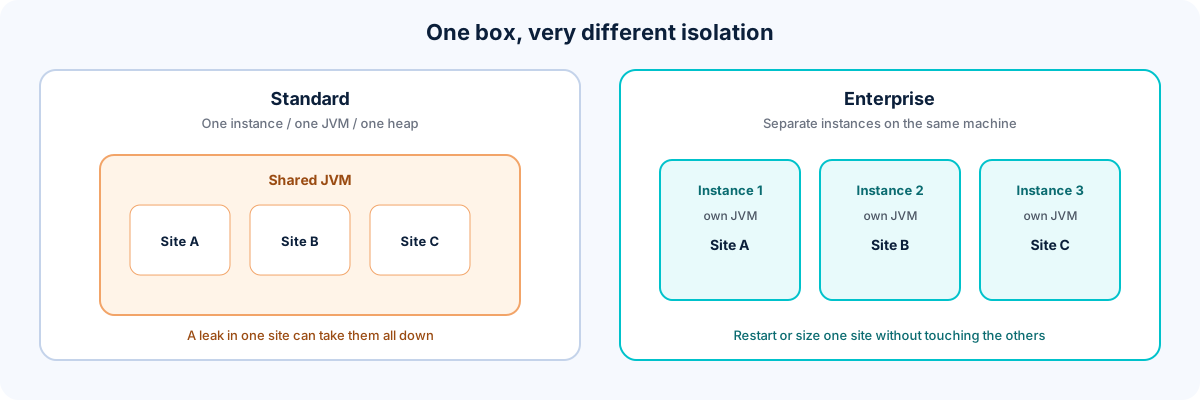
Enterprise can run several isolated ColdFusion instances on one machine, each with its own JVM, heap, service, and admin. It also supports clustering and load balancing across instances.
Standard gives you one instance per license. That means:
- All sites on the box share one JVM and one heap. A memory leak or runaway request in one application can take down the others.
- You can't size or restart one site independently.
- Splitting "authoring" and "public delivery" onto separate instances on the same machine is not an option. Separate boxes mean separate Standard licenses.
The Standard-friendly pattern is separate machines behind an external load balancer. It works, but it's more servers to patch and license.
3. Licensing: subscription first, and the 2-core rule
Current ColdFusion licensing is subscription-based. You pay annually (or on the billing term Adobe/your reseller offers), and access and support stop when the subscription lapses. Upfront / perpetual purchase pricing still shows up only for older releases where Adobe continues to offer them. If you are standing up a new server on a supported current release, budget for a subscription, not a one-time license fee.
Under Adobe's per-core terms, a Standard subscription covers up to 2 cores and an Enterprise subscription up to 8. "Core" includes virtual cores: a vCPU in a cloud VM counts. Confirm the current product description for the release you are buying; core counts have been the long-running model, but terms can change with the subscription SKUs.
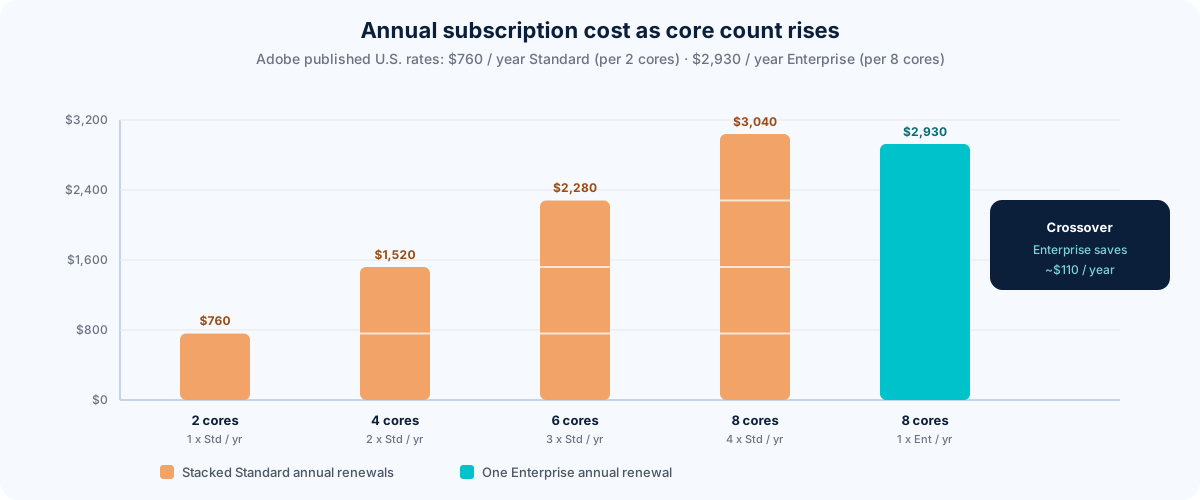
Adobe's published U.S. direct-store annual prices for the current subscription model have been roughly $760 per Standard subscription and $2,930 per Enterprise subscription (reseller pricing can differ; confirm before you buy). The math is annual renewals, not a one-time purchase:
- A 2 vCPU Standard server: 1 × $760 = $760/year.
- A 4 vCPU Standard server needs two Standard subscriptions: 2 × $760 = $1,520/year.
- A 6 vCPU Standard footprint: 3 × $760 = $2,280/year.
- An 8 vCPU Standard stack: 4 × $760 = $3,040/year, versus 1 × $2,930 = $2,930/year for one Enterprise subscription covering the same 8 cores. At that point Enterprise is the cheaper renewal, before you even count the edition features.
- Adobe's terms let you count only the cores actually allocated to the software when you limit them with reliable hardware or software partitioning. Many teams start a Standard server at 2 vCPU and move to 4 later if the workload demands it.
One thing worth knowing: community reports consistently say the installer doesn't stop you and nothing in the logs flags a box with more than two cores. The limit is contractual, not technical. That's not a loophole. It means the risk is silent non-compliance that surfaces at a renewal, audit, or support case. If you cap CPUs with something like Windows processor affinity, document it, because affinity settings can reset on service reinstalls and updates. A JVM processor-count flag is also commonly set alongside it. Confirm your approach with Adobe licensing in writing.
4. Database drivers (the Oracle question)
Enterprise and Developer editions bundle Adobe-supplied (DataDirect) JDBC drivers for databases such as Oracle, DB2, and Sybase. Standard doesn't.
That does not mean Standard can't talk to Oracle. The long-established workaround is to add the datasource as an "Other" JDBC connection, drop Oracle's own free thin driver (the ojdbc jar) into ColdFusion's lib folder, restart, and enter the JDBC URL and driver class by hand. Plenty of Standard shops run this way.
What you lose is Adobe's official support for that connector. Adobe's support matrix lists Oracle under Enterprise, so if you hit a driver-specific problem, expect to troubleshoot with Oracle's documentation rather than Adobe's. Also test any feature that leans on driver-specific behavior (for example, certain stored-procedure return types).
5. Scheduled tasks, request tuning, and email
- Scheduled tasks: basic scheduling works in Standard. Clustered tasks, misfire and exception handling, task chaining, and listeners are Enterprise features. Some options may appear in the Standard admin screen but not function.
- Request tuning: Enterprise lets you set separate simultaneous-request limits for pages, components/remote calls, web services, and remoting. Standard has a single shared limit. On a site with a busy public side and a heavy AJAX-driven admin or authoring interface, you can't reserve capacity for one against the other. A traffic spike can starve your editors, and a heavy editing session can slow the public site.
- Thread limits: older community testing found a cap on concurrent
cfthreadusage in Standard. Check current behavior if you rely on heavy threading. - High-volume email: Adobe documents mail delivery thread and spooling controls as Enterprise-only. If you send large volumes with
cfmail, the cleaner fix is usually to relay through a dedicated SMTP service instead of tuning ColdFusion's spooler.
6. What Standard now includes (it's not what it used to be)
Several things once reserved for Enterprise are available in Standard today, including the ColdFusion Administrator user manager, the security sandbox, CAR archive files, event gateways, WebSockets without a tight cap, and the performance monitoring toolset introduced with ColdFusion 2018. Outdated advice that says "you need Enterprise for monitoring" is often wrong now.
In the 2025 release, Adobe lists the new AI-related capabilities (model integration, retrieval-augmented generation, vector database support, MCP connectivity), LDAP/SAML integration, JWT support, GraphQL client, and cloud storage integration as available in both editions. Multiple server instances, clustering, the security code analyzer, SOAP-to-REST translation, API developer portal, request limit management, and several scheduled-task features remain Enterprise-only.
7. Don't forget the version and support calendar
Edition is only half the decision. Version matters just as much:
| Release | End of core support | End of extended support |
|---|---|---|
| ColdFusion 2018 | July 13, 2023 | July 13, 2024 |
| ColdFusion 2021 | November 10, 2025 | November 10, 2026 |
| ColdFusion 2023 | May 16, 2028 | May 16, 2029 |
| ColdFusion 2025 | February 26, 2030 | n/a listed |
Extended support is about helping you migrate; it does not bring continued security updates after core support ends. If you're still on 2021 today, you're already past the last update, so treat any move to a new server as a chance to land on a supported release.
On licensing for current releases: it is subscription-only. Access and support stop when the subscription lapses. Older versions may still be offered with an upfront purchase price where Adobe continues to sell them; do not assume a perpetual SKU exists for the release you want. Confirm edition, term, and core allocation on Adobe's buying guide or with your reseller, then run the Section 3 math against those annual numbers for your actual core count.
8. A quick decision guide
Standard is probably enough if:
- You run one or a few applications on a single server with 2 vCPU (or a few small servers behind a load balancer).
- PDF/document generation is occasional, not bursty.
- You can connect to your database with a standard JDBC driver.
- You don't need clustering, per-site JVM isolation, or advanced scheduling.
Look hard at Enterprise if:
- Several business-critical sites share one server and must be isolated from each other.
- Users trigger PDF or report generation in bursts.
- You need clustering, distributed caching, API management, or advanced scheduled-task behavior.
- You'd otherwise stack enough Standard subscriptions (roughly 7-8 cores) that Enterprise is the cheaper path.
- You rely on Adobe-supported database drivers for compliance or support reasons.
Either way: test before you cut over. Stand up the target server, replay realistic load (especially report and export traffic), and watch for queued requests and thread buildup.
9. Hosting someone else's license
If you'd rather not own the licensing question, many ColdFusion hosting providers supply the license as part of the plan, which changes the cost math and moves compliance to the host. Ask exactly which edition and core allocation you're getting.
10. Where to subscribe (or buy an older release)
For current ColdFusion, you are shopping for a subscription, not a one-time license. You can go direct to Adobe, but we recommend subscribing or renewing through a reseller. Our pick is buy-adobe-software.com, the ColdFusion store from Intergral. They are best known for FusionReactor, which we use extensively for server tuning, monitoring, and troubleshooting. Buying through them usually includes a reseller discount, and they often package FusionReactor at a better rate when you buy both. If you specifically need an older release that still has an upfront purchase option, ask them what Adobe is still selling before you assume a perpetual SKU exists.
For more purchasing notes and other reseller options, see our post on purchasing Adobe ColdFusion.
FAQ
Is ColdFusion Standard missing features compared to Enterprise?
Yes, a defined set: multiple instances, clustering, certain database drivers, advanced scheduling, request-limit controls, and a few others. Most application code runs unchanged.
Will Standard slow my site down?
Not in general. The risk is specific: throttled PDF/document tags and the single shared request limit can create queues under bursty load.
Can I use Oracle with ColdFusion Standard?
Yes, through the "Other" JDBC datasource option with Oracle's own driver, though it falls outside Adobe's official support matrix.
How many cores can one Standard subscription cover?
Two, under Adobe's per-core terms. Check the current terms for the release you're buying.
Does Adobe still sell perpetual licenses?
Current ColdFusion is subscription-only. Upfront / perpetual purchase pricing applies only to older versions where Adobe still offers them. Confirm what is available for the release you need before you budget.
Which version should I be on today?
A release still in core support: 2023 or 2025. ColdFusion 2021 is past its final update.
Need help deciding or migrating?
We host, administer, and develop ColdFusion applications, and we can size a server, audit your code for Enterprise-dependent features, and handle the migration. Contact Tierney Dynamics to talk it through, or see our managed hosting and application server maintenance services.
Comments