Managed Hosting Add-On

Web Application Firewall (WAF)

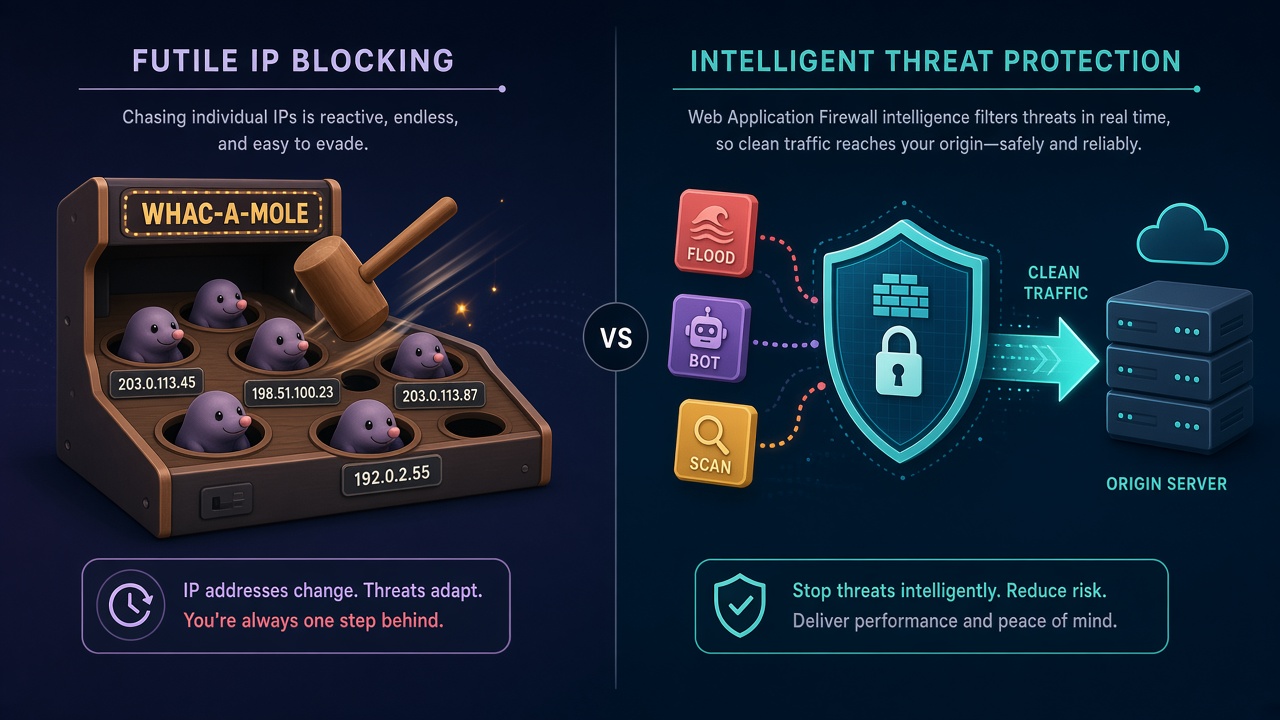
When malicious traffic hits, blocking IPs one by one is a game of whack-a-mole — attackers rotate addresses and spread load across many sources. A WAF stops patterns and floods at the edge instead. Choose Cloudflare or AWS — we handle setup and ongoing management.

Illustration comparing whack-a-mole IP blocking with a WAF edge filter that lets clean traffic reach the origin
Blocking IPs is whack-a-mole. A WAF filters the pattern so the origin only sees clean traffic.

Customers get targeted with scrapers, credential stuffing, and flood traffic. We can block IPs at the firewall, but that often fails when the attacker rotates addresses or distributes the attack across many IPs — you spend time chasing sources while the origin still takes the hit.

A web application firewall sits in front of the site and filters by behavior: known attack signatures, rate limits, bot controls, and custom rules. That stops more of the noise before it reaches your servers. For managed hosting customers, Tierney Dynamics offers Cloudflare and AWS options at the vendor Free and Pro tiers, plus a flat management fee and (for Cloudflare) a one-time setup that includes a tunnel so the origin is not left open on the public internet.

Platform rates below match current vendor list pricing. Free flat-rate plans include a $20/mo management fee. Pro plans are $30/mo management, with a 6-month special at $20/mo. AWS WAF pay-as-you-go is usage-only. Vendor pricing can change; we bill platform costs at the then-current published rate.
Cloudflare

Cloudflare Plans

Free and Pro platform rates from cloudflare.com/plans, quoted month-to-month with no annual commitment. One-time $99 setup includes a Cloudflare Tunnel.

Cloudflare Free

Personal or hobby projects that are not business-critical.

$20/mo

$0 platform + $20 management

  • ✓ Platform: $0/mo
  • ✓ Management: $20/mo
  • ✓ Setup: $99 (one-time, includes Cloudflare Tunnel)
  • ✓ CDN, DNS, and Universal TLS (SSL)
  • ✓ Unmetered DDoS protection
  • ✓ Free managed WAF ruleset
  • ✓ DNS must be hosted on Cloudflare
Request this plan

Cloudflare Pro

Professional websites that need stronger edge features.

$45/mo

First 6 months: $25 platform + $20 management

Then $55/mo ($25 platform + $30 management)

  • ✓ Platform: $25/mo (no annual commitment)
  • ✓ Management: $30/mo ($20/mo for 6 months)
  • ✓ Setup: $99 (one-time, includes Cloudflare Tunnel)
  • ✓ CDN, DNS, Universal TLS (SSL), and DDoS protection
  • ✓ Cloudflare & OWASP managed WAF rulesets
  • ✓ WAF custom rules and Super Bot Fight Mode
  • ✓ Image optimization (Polish) and WordPress APO
  • ✓ DNS must be hosted on Cloudflare
Request this plan
Amazon Web Services

AWS Plans

CloudFront Free and Pro flat-rate plans from AWS Pricing Plan Manager, with a one-time $49 setup fee — or classic AWS WAF pay-as-you-go when traffic or architecture does not fit a flat rate.

Amazon CloudFront

AWS CloudFront + WAF Free

1M requests and 100 GB transfer per month. No overage charges.

$20/mo

$0 platform + $20 management

  • ✓ Platform: $0/mo
  • ✓ Management: $20/mo
  • ✓ Setup: $49 (one-time)
  • ✓ CloudFront CDN, Route 53 DNS, and TLS certificate
  • ✓ Always-on DDoS protection
  • ✓ WAF for common web threats (5 rules)
  • ✓ No overage charges during spikes or attacks
  • ✓ Dedicated managed hosting account plans only; max 3 implementations
Request this plan
Amazon CloudFront

AWS CloudFront + WAF Pro

10M requests and 50 TB transfer per month. No overage charges.

$35/mo

First 6 months: $15 platform + $20 management

Then $45/mo ($15 platform + $30 management)

  • ✓ Platform: $15/mo
  • ✓ Management: $30/mo ($20/mo for 6 months)
  • ✓ Setup: $49 (one-time)
  • ✓ CloudFront CDN, Route 53 DNS, and TLS certificate
  • ✓ Always-on DDoS protection
  • ✓ Use-case WAF (PHP, WordPress, SQL; 25 rules)
  • ✓ Logging and serverless edge compute
  • ✓ No overage charges during spikes or attacks
Request this plan
AWS WAF

AWS WAF

Usage-based AWS WAF billed by web ACL, rules, and requests — sized to your traffic.

Contact for estimate

Billed on AWS usage — no management fee

  • ✓ Works with ALB, CloudFront, API Gateway, and more
  • ✓ Custom rules and AWS Managed Rules groups
  • ✓ Rate-based rules, CAPTCHA, and Challenge actions
  • ✓ Optional Bot Control and logging
  • ✓ Cost scales with rules and request volume
  • ✓ Best when flat-rate plans are not a fit
Contact for estimate

Should I pick Cloudflare or CloudFront?

Pick based on where your DNS lives (or must live), then on rate limiting and logging. Price is close between the two, though Cloudflare’s rate limiting is much tighter on its low tiers.

Choose CloudFront + WAF when

  • ✓ You can’t or don’t want to move DNS.
  • ✓ Everything is already on AWS and you want tight integration.
  • ✓ You need WAF logs on a low-cost plan, which only Pro offers on the AWS side.

Choose Cloudflare when

  • ✓ You control a domain’s DNS and can move it wholesale, especially if you have many domains to protect at low cost.
  • ✓ Cloudflare may offer certain protections that help defend against vulnerabilities that may not be able to be patched on the origin server.

Free vs Pro in each case

  • ✓ Cloudflare Pro is worth it when one rate-limit rule isn’t enough or you want the full managed WAF ruleset.
  • ✓ CloudFront Pro is worth it when you want logs, the SQL protections, or more rules. It’s cheaper than Cloudflare Pro.

Important Notes

Read these before choosing a plan — they affect eligibility, DNS, and total cost.

  1. 1. Cloudflare DNS

    Cloudflare plans require DNS to be hosted on Cloudflare. Domains not already on Cloudflare will need a DNS cutover as part of setup.

  2. 2. Cloudflare setup fee

    Cloudflare Free and Pro include a $99 one-time setup fee. That fee covers a Cloudflare Tunnel so the origin server is not exposed for direct access.

  3. 3. Management fee

    Free flat-rate plans include a $20/mo management fee. Cloudflare Pro and AWS Pro are $30/mo management, with a 6-month special at $20/mo. AWS WAF pay-as-you-go has no management fee.

  4. 4. AWS Free eligibility

    The free AWS tier is only available for dedicated managed hosting account plans and is limited to 3 implementations.

  5. 5. AWS flat-rate setup fee

    AWS Free and Pro flat-rate plans include a $49 one-time setup fee. AWS WAF pay-as-you-go has no setup fee listed here — contact for an estimate.

Add WAF Protection

Tell us which sites need coverage and whether you prefer Cloudflare or AWS. We will confirm eligibility, quote the setup, and schedule the cutover.