
If you run Let's Encrypt certificates on Amazon Linux 2023 (AL2023), there's a good chance certbot is quietly running on an old version of Python, and that it will soon stop getting updates. The fix is easy, but the obvious fix ("just upgrade Python") is exactly the wrong one. Here's what's going on, why it matters, and how to fix it properly.
How certbot usually gets installed on AL2023
On Ubuntu or Debian, the recommended way to install certbot is the snap package, which bundles its own Python. AL2023 doesn't ship with snapd, so most people follow the certbot project's pip instructions instead: create a Python virtual environment in /opt/certbot, pip install certbot into it, and symlink the binary into your path.
sudo python3 -m venv /opt/certbot
sudo /opt/certbot/bin/pip install --upgrade pip
sudo /opt/certbot/bin/pip install certbot certbot-nginx
sudo ln -s /opt/certbot/bin/certbot /usr/bin/certbot
That works well. But notice the first line: python3 -m venv. A virtual environment is permanently tied to the Python interpreter that created it. On AL2023, python3 means one specific version, and it isn't going to change.
AL2023 freezes its system Python at 3.9
Amazon Linux 2023 ships Python 3.9 as its system Python, the interpreter behind /usr/bin/python3. AWS has committed to keeping it at 3.9 for the whole life of the distribution, so that customer code and the OS's own Python-based tools stay compatible.
Python 3.9 reached end of life upstream in October 2025, but that's not a security emergency on AL2023: AWS keeps patching its own copy of 3.9 until AL2023 itself reaches end of support in June 2029.
So the OS is fine. The problem is the third-party software you've built on top of that Python.
How the system Python holds certbot back
Certbot follows the upstream Python support schedule, not AWS's. When a Python version reaches end of life upstream, certbot drops support for it in a following release. If your certbot is on 3.9, you'll start seeing this every time it runs:
Python 3.9 support will be dropped in the next planned release of Certbot - please upgrade your Python version.Once that release ships, pip install --upgrade certbot doesn't fail. pip quietly installs the last release that still supports 3.9 and stops there. Your renewals keep working for now, so nothing looks wrong. But from that point on, certbot is frozen in place:
- No bug fixes or security fixes. Certbot handles your private keys and talks to the internet with root privileges, so you want it current.
- No new ACME features. Let's Encrypt keeps changing how it works (certificate lifetimes, renewal signals, chain changes). A certbot that stopped updating years ago is the kind of thing that fails a renewal at 2 a.m. on a Sunday.
- Silent failure mode. Automated renewals run every 12 hours with
--quiet. You often find out certbot has a problem when the site's certificate expires and browsers start showing warnings.
In other words, the risk doesn't show up when certbot stops updating. It shows up months later, at the worst possible moment.
The tempting fix: upgrade the server's Python
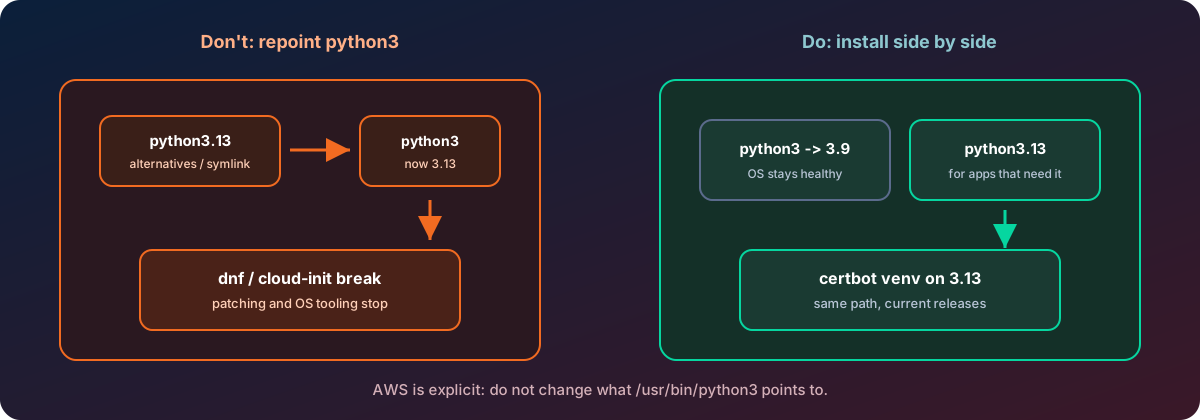
The instinct is to "upgrade Python" on the whole server, for example by pointing /usr/bin/python3 at a newer interpreter with alternatives or a symlink. Don't.
AWS is explicit about this in the AL2023 documentation: do not change what /usr/bin/python3 points to, because it can break the core functionality of AL2023.
That's not theoretical. On AL2023, the system Python runs the operating system itself:
dnf, the package manager, is written in Python. Its libraries are installed only for 3.9. Repointpython3anddnfstops working, so you can no longer install or update packages, including security patches.cloud-init(instance boot and configuration) and other AWS and OS tooling depend on it too.- Automated patching breaks with it. If you patch with AWS Systems Manager Patch Manager, it drives
dnfunder the hood. A brokendnfmeans patching quietly stops.
You'd be trading a certbot problem for a much bigger, harder-to-diagnose OS problem.
The right fix: install a newer Python side by side
AL2023 is designed for this. Newer Python versions are packaged separately, with the version in the name: python3.11, python3.12, python3.13, and so on. Each installs as its own binary (for example /usr/bin/python3.13) next to /usr/bin/python3.9. Meanwhile /usr/bin/python3 keeps pointing at 3.9, so the OS never notices. AWS supports these packages for the upstream life of each version.
See what's available:
dnf list --available 'python3.1*'Then install the version you want. Python 3.13 is a good choice today: upstream supports it until October 2029, which outlasts AL2023 itself.
sudo dnf install -y python3.13
python3.13 -V      # Python 3.13.x
python3 -V         # still Python 3.9.x, as it should be
The system Python is untouched, and you now have a modern interpreter for the software that needs one.
Rebuilding certbot's virtual environment on the new Python
A virtual environment can't be moved or "upgraded" in place, because its scripts have the interpreter path and their own location baked in. The clean approach is to set the old venv aside and build a new one at the same path. That way nothing that calls certbot needs to change: not your renewal timer, not your symlink, not your automation.
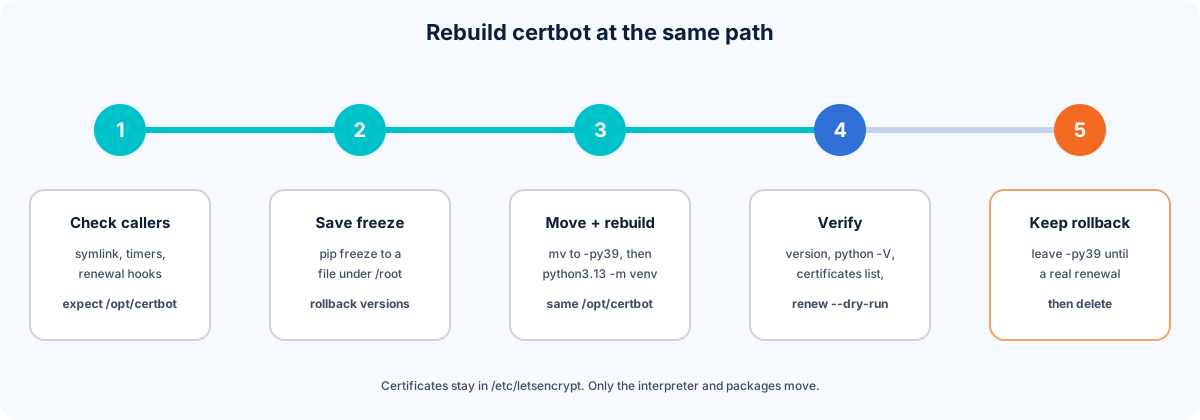
1. Check what calls certbot
ls -l /usr/bin/certbot                      # usually a symlink into /opt/certbot
systemctl list-timers | grep -i certbot     # the renewal timer
systemctl cat certbot-renew.service         # what it runs (name varies)
ls /etc/letsencrypt/renewal-hooks/*/ 2>/dev/null
If everything points at /opt/certbot/..., rebuilding at the same path means zero config changes.
2. Record the current versions
sudo /opt/certbot/bin/pip freeze > /root/certbot-freeze-pre-upgrade.txt3. Set the old venv aside and build the new one
sudo mv /opt/certbot /opt/certbot-py39
sudo python3.13 -m venv /opt/certbot
sudo /opt/certbot/bin/pip install --upgrade pip
sudo /opt/certbot/bin/pip install certbot certbot-nginx   # add any other plugins you use
Your certificates, account and renewal settings all live in /etc/letsencrypt, not in the venv, so there's nothing to migrate.
Tip: if you want to change only one thing at a time, install the same certbot version you had first (e.g. certbot==4.2.0 certbot-nginx==4.2.0), confirm it works, then upgrade to the latest.
4. Verify before you walk away
certbot --version
/opt/certbot/bin/python -V                 # should report 3.13
sudo certbot certificates                  # your certs are all still listed
sudo certbot renew --dry-run               # end-to-end test against Let's Encrypt staging
sudo systemctl start certbot-renew.service && systemctl status certbot-renew.service
The dry run is the important one: it does a full renewal against Let's Encrypt's staging environment without touching your real certificates.
5. Keep a rollback for a renewal cycle or two
Leave /opt/certbot-py39 in place until a real renewal has gone through on the new setup. Note that the old venv only works at its original path, so rolling back means moving it back:
sudo mv /opt/certbot /opt/certbot-py313.bad
sudo mv /opt/certbot-py39 /opt/certbot
sudo certbot renew --dry-run
Once you're confident, delete the old one.
Keep it current from here
Rebuilding on a newer Python solves today's problem. Staying current is what prevents the next one. Schedule a regular job (we use a weekly AWS Systems Manager maintenance-window task) that:
- saves a
pip freezeof the venv, - runs
pip install --upgrade certbot certbot-nginxinside it, - runs
certbot renew --dry-run, and - automatically restores the frozen versions if the dry run fails.
That way certbot keeps getting fixes, and a bad release can never leave you with a broken renewal.
The short version
| Do | Don't |
|---|---|
Leave /usr/bin/python3 on AL2023's system Python 3.9 |
Repoint python3 with alternatives or a symlink |
dnf install python3.13 alongside it |
Build Python from source and overwrite system paths |
| Rebuild certbot's venv on the newer Python, at the same path | Assume renewals working today means certbot is fine |
Test with certbot renew --dry-run and keep a rollback |
Upgrade blind with no saved versions |
| Automate weekly upgrades with a dry-run check | Wait for the warning to turn into an expired certificate |
The same pattern applies to anything you run on AL2023 that needs a newer Python: leave the system interpreter to the OS, and give your applications their own.
Need help keeping certificates, patching and servers healthy without the 2 a.m. surprises? Contact Tierney Dynamics.
Comments